

AI-generated image
ROOS SF DATEV Connector
Easily connect SAP SuccessFactors and DATEV
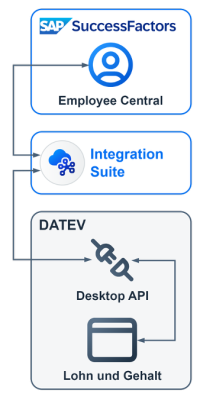
The ROOS SF DATEV Connector automatically transfers relevant HR data from SAP SuccessFactors Employee Central to DATEV Lohn & Gehalt. This reduces the need for duplicate data entry and ensures a seamless flow of data from Employee Central to DATEV.
THE INITIAL SITUATION
When Employee Central and DATEV are used in parallel
SAP SuccessFactors Employee Central serves as the central system for managing employee master data. Payroll processing, on the other hand, is often carried out using DATEV Lohn & Gehalt.
Without an SAP SuccessFactors–DATEV interface, some payroll-related information has to be maintained in both systems – both when an employee joins the company and in the event of subsequent changes or when they leave.
Employee onboarding
New employee data is entered in Employee Central. Without an interface, payroll-relevant information must also be entered manually in DATEV.
Changes
If relevant employee data changes, for example due to a change of address, this information must also be updated manually in DATEV if no interface is in place.
Employee departure
When an employee leaves the company, relevant information must also be updated in both systems if no interface is in place.
Without an interface, data has to be maintained twice.
Some information that already exists in Employee Central needs to be re-entered in DATEV.
THE SOLUTION
Enter the data once in Employee Central rather than entering it twice
This is exactly where the ROOS SF DATEV Connector comes in. Relevant data is automatically transferred from SAP SuccessFactors Employee Central to DATEV Lohn & Gehalt.
This means that information already maintained in Employee Central does not need to be entered manually into DATEV again. Only data that is not available in Employee Central will continue to be added directly to DATEV.
You can find further options for integrating SAP SuccessFactors with other systems on our overview page for SAP SuccessFactors integrations.
WITHOUT AN INTERFACE
SAP SuccessFactors Employee Central
Manual maintenance
DATEV Lohn & Gehalt
WITH AN INTERFACE
SAP SuccessFactors Employee Central
Automated transfer
DATEV Lohn & Gehalt
FEATURES
What does an SAP SuccessFactors–DATEV integration offer?
The ROOS SF DATEV Connector supports the automated transfer of relevant data throughout the employee lifecycle. Where required, the standard solution can be extended to meet customer-specific requirements.
YOUR BENEFITS
Less manual maintenance, more end-to-end processes
Automated data transfer between Employee Central and DATEV reduces the amount of manual maintenance required. At the same time, data can be maintained more consistently and HR processes can be organised more efficiently.
- Less duplicate data maintenance
- Time savings
- Better data quality
- Fewer changes of media
- End-to-end HR processes
- Can be customised
IMPLEMENTATION
Five steps to setting up the ROOS SF DATEV Connector
From the initial analysis right through to go-live, we support the implementation of the ROOS SF DATEV Connector every step of the way, taking into account the existing system landscape and individual requirements.
We analyse the existing system landscape and clarify the requirements for the interface.
The ROOS SF DATEV Connector is first set up in the test environment.
Where necessary, we add customised functions and enhancements.
Data transmission is being tested and jointly assessed against the defined requirements.
Following successful testing, the ROOS SF DATEV Connector will be deployed to the production system.
Your contact person

Axel Krausen – Managing Partner
Tel.: +49 241 894 396 49
E-Mail: axel.krausen@roos-it.de
Select a date from my calendar: Booking page